
Häufig gestellte Fragen
EQ21852
USB-C पावर डिलीवरी के साथ तेज़ी से चार्ज करने के लिए मुझे किन केबलों का उपयोग करना चाहिए?
Mit den USB-C PD (Power Delivery) Schnelllade-Netzteilen von tizi kannst du deine Geräte um ein Vielfaches schneller aufladen. Hierfür ist allerdings auch das richtige Kabel notwendig.
Geräte mit Lightning-Anschluss schnell aufladen (iPhone 13, iPhone 12, iPhone 11, iPhone X, iPhone 8, iPad Pro)
Folgende Lightning-Geräte von Apple unterstützen den USB-C Power Delivery Schnelllade-Mechanismus:- iPhone 13 Pro Max
- iPhone 13 Pro
- iPhone 13
- iPhone 13 mini
- iPhone 12 Pro Max
- iPhone 12 Pro
- iPhone 12
- iPhone 12 mini
- iPhone 11 Pro Max
- iPhone 11 Pro
- iPhone 11
- iPhone SE (2. Generation)
- iPhone XS
- iPhone XS Max
- iPhone Xr
- iPhone X
- iPhone 8
- iPhone 8 Plus
- iPad Pro 12.9"
- iPad Pro 11"
- iPad Pro 10.5"
- iPad Pro 9.7"
Geräte mit USB-C Anschluss schnell aufladen
Folgende USB-C Geräte von Apple unterstützen den USB-C Power Delivery Schnelllade-Mechanismus: iPad- iPad Pro 12.9 Zoll (5. Generation)
- iPad Pro 11 Zoll (4. Generation)
- iPad Air (4. Generation)
- iPad mini (6. Generation)
- iPad Pro 11 Zoll (3. Generation)
- iPad Pro 12.9 Zoll (4. Generation)
- iPad Pro 11 Zoll (2. Generation)
- iPad Pro 12.9 Zoll (3. Generation)
- iPad Pro (11 Zoll)
- iPad Pro 12.9 Zoll (2. Generation)
- iPad Pro (11 Zoll)
- MacBook Pro (16 Zoll, 2020, mit M1-Chip)
- MacBook Pro (13 Zoll, 2020, mit M1-Chip)
- MacBook Pro (16 Zoll, 2019)
- MacBook Pro (13 Zoll, 2019, zwei Thunderbolt 3-Anschlüsse)
- MacBook Pro (15 Zoll, 2019)
- MacBook Pro (13 Zoll, 2019, vier Thunderbolt 3-Anschlüsse)
- MacBook Pro (15 Zoll, 2018)
- MacBook Pro (13 Zoll, 2018, vier Thunderbolt 3-Anschlüsse)
- MacBook Pro (15 Zoll, 2017)
- MacBook Pro (13 Zoll, 2017, Vier Thunderbolt 3 Anschlüsse)
- MacBook Pro (13 Zoll, 2017, Zwei Thunderbolt 3 Anschlüsse)
- MacBook Pro (15 Zoll, 2016)
- MacBook Pro (13 Zoll, 2016, Vier Thunderbolt 3 Anschlüsse)
- MacBook Pro (13 Zoll, 2016, Zwei Thunderbolt 3 Anschlüsse)
- MacBook (Retina, 12 Zoll, 2017)
- MacBook (Retina, 12 Zoll, Anfang 2016)
- MacBook (Retina, 12 Zoll, Anfang 2015)
- MacBook Air (Retina, 13 Zoll, 2020)
- MacBook Air (Retina, 13 Zoll, 2019)
- MacBook Air (Retina, 13 Zoll, 2018)
- iMac (M1, 24 Zoll, 4 Anschlüsse, 2021)
- iMac (M1, 24 Zoll, 2 Anschlüsse, 2021)
Aufladen mit dem tizi Schlitzohr
Das tizi Schlitzohr ist für das schnelle Aufladen mit USB-C Power Delivery nicht geeignet, da es über USB-A Stecker angeschlossen wird. Es ist schon möglich, deine USB-C Geräte mit dem tizi Schlitzohr zu laden, allerdings wird hier das USB Standard Protokoll verwendet und die Aufladung erfolgt mit maximal ca. 12W.
tizi Club सदस्यता मुझे क्या लाभ प्रदान करती है?
आपके tizi उत्पाद में tizi क्लब सदस्यता के लिए एक कार्ड शामिल हो सकता है। इस क्लब कोड के साथ अपने उत्पाद को पंजीकृत करने से आपको कुछ लाभ मिलेंगे:
- नए tizi उत्पादों के बारे में जानकारी, कभी-कभी पहले से और विशेष रूप से क्लब सदस्यों के लिए
- my.tizi.tv के माध्यम से आपके अपने tizi उत्पादों का सुविधाजनक प्रबंधन और अवलोकन
- my.tizi.tv पोर्टल के माध्यम से चालानों तक सुविधाजनक पहुंच और पुनर्प्राप्ति
- क्लब सदस्यों के लिए विशेष प्रचार
- समर्थन अनुरोधों का प्राथमिकता प्रसंस्करण
इसलिए, हम सभी ग्राहकों को इस ऑफ़र का लाभ उठाने और अपने tizi उत्पादों को पंजीकृत करने की सलाह देते हैं।
क्या मैं tizi flip USB-C केबल से iPad Pro (2018) चार्ज कर सकता हूँ?
हाँ, tizi flip USB-C iPad Pro (2018) के साथ पूरी तरह से संगत है।
मुझे tizi केबल क्यों खरीदनी चाहिए? Amazon या eBay जैसे मार्केटप्लेस पर बहुत सस्ते (चीन) केबल भी उपलब्ध हैं?
सस्ते केबल का उत्पादन केवल केबल में तांबे की मात्रा बचाकर किया जा सकता है। इसलिए, इन सस्ते चीनी केबलों में तांबे की मात्रा आमतौर पर बहुत कम होती है। हमारी परीक्षण खरीद से कभी-कभी विनाशकारी तस्वीर सामने आई: उच्च चार्जिंग प्रदर्शन पर, इससे केबल गर्म हो सकती है और, सबसे खराब स्थिति में, आग लग सकती है। इसलिए, केबल खरीदते समय पैसे बचाने की दृढ़ता से सलाह दी जाती है। थोड़े से पैसे के लिए आपको हमेशा थोड़ा तांबा मिलता है।
सभी tizi केबल की विशेषता गारंटीकृत उच्च तांबे की मात्रा, ठोस कारीगरी और Apple से Mfi जैसे आधिकारिक प्रमाणन हैं।
मेरे पास एक मैकबुक एयर है जो USB-C से चार्ज होता है और केवल 30 वाट से। क्या मैं एक tizi USB-C पावर एडाप्टर का भी उपयोग कर सकता हूं जो अधिक वाट प्रदान करता है?
उत्तर स्पष्ट है: हाँ। USB-C डिवाइस चार्जिंग के लिए PD, पावर डिलीवरी मानक का उपयोग करते हैं। यहां, डिवाइस, जैसे कि MacBook Air, tizi पावर एडाप्टर से पूछता है कि tizi पावर एडाप्टर अधिकतम कितने वाट प्रदान कर सकता है। फिर MacBook Air में चार्जिंग कंट्रोलर शुरू होता है और सक्रिय रूप से ठीक उतनी शक्ति खींचता है जितनी उसे चार्ज करने के लिए चाहिए। यदि, उदाहरण के लिए, केवल 30 वाट की आवश्यकता है, तो MacBook Air केवल 30 वाट खींचता है। इसलिए, एक अधिक शक्तिशाली tizi पावर एडाप्टर कभी भी USB-C डिवाइस को नुकसान नहीं पहुंचा सकता है। डिवाइस स्वयं बिजली की खपत का निर्णय लेता है।
USB-C क्या है? मुझे USB-C की आवश्यकता क्यों है?
USB-C is a new connector type, which largely replaces the previous square USB-A connector.
The advantages of USB-C:
- The USB-C connector is reversible, there is no longer a top and bottom
- With USB-C you can charge much faster than with old USB-A connectors
- USB-C enables faster data communication
- The number of different USB connector types is significantly reduced
Reversible:
The USB-C connector is flat and rounded on the sides. It remains largely symmetrical and can be inserted in both directions. With old USB connectors, such as USB-A or Micro USB, a special reversible cable like a tizi flip cable had to be used to enable reversible insertion. With USB-C, this is part of the technology. The connector can be inserted in both directions and thus protects both the connector and the socket from damage due to incorrect insertion. And it is of course much more practical.Faster charging:
USB-C generally enables faster charging than standard USB, but fast charging must be supported by both the end device and the power supply. The so-called USB-C Power Delivery or USB-C PD is used to charge much faster. With the previous standard USB-A, 12 watts were usually charged, with USB-C PD charging with 5W to 100W is possible. This also makes it possible to charge computers such as the Apple MacBook and other powerful devices via USB-C.Note: Due to the higher performance with USB-C PD, there is also a greater potential danger to connected devices. Therefore, especially with USB-C Power Delivery power supplies, it is important to use only quality products such as tizi power supplies.
Faster data communication
Generally, a USB-C connector also supports faster data transfer, but this depends on both the devices used and the connector and the cable. Fastest speeds of up to 20 Gbit/s can be achieved with compatible devices with USB 3.2 Gen2x2 and via corresponding USB-C connectors and cables.Only one connector for everything
The previous USB connector has various designs:- USB-A Male and Female
- USB-B
- Micro-USB A
- Micro USB-B
- USB Mini-B
- USB 3.0 A
- USB 3.0 B
- etc.
मुझे किस tizi केबल की आवश्यकता है?
अपनी डिवाइस के लिए सही tizi केबल खोजने के लिए, कृपया चित्र में पोर्ट की तुलना अपने डिवाइस से करें। इससे आपको पता चल जाएगा कि आपको USB-A, USB-C, लाइटनिंग या माइक्रो-USB कनेक्टर की आवश्यकता है या नहीं।
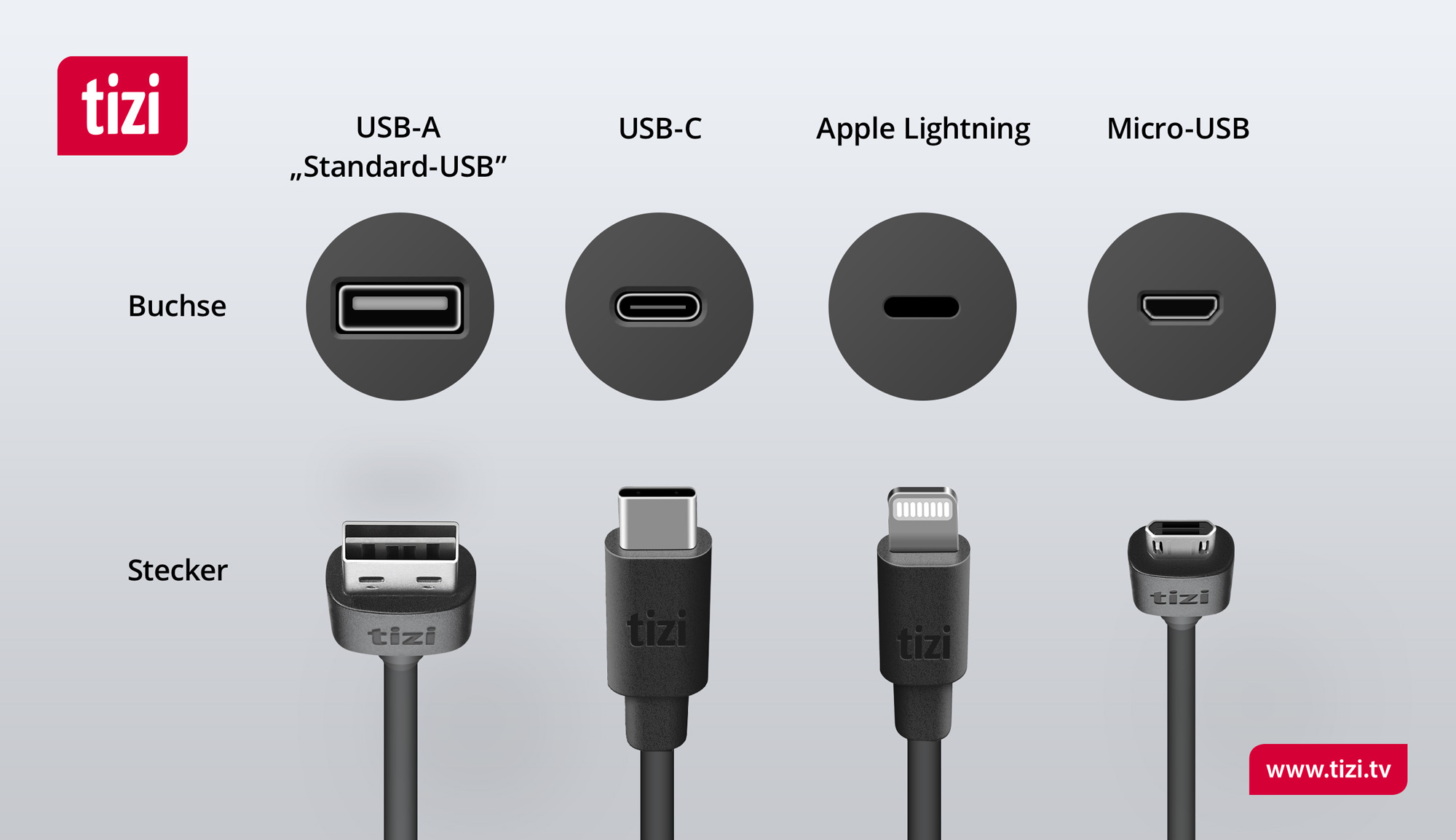
चार्जर साइड
USB-A
USB-A को स्टैंडर्ड USB भी कहा जाता है। यह सामान्य-तेज़ से लेकर तेज़ चार्जिंग की अनुमति देता है। USB-A कनेक्टर का उपयोग निम्नलिखित tizi केबलों में किया जाता है:- tizi Flip लाइटनिंग
- tizi Flip माइक्रो USB
- tizi Querdenker/in लाइटनिंग
- tizi Querdenker/in माइक्रो USB
- tizi Spiralkabel लाइटनिंग
- tizi Spiralkabel माइक्रो USB
- tizi Schlitzohr
- tizi Schlingel लाइटनिंग
- tizi Schlingel माइक्रो USB
USB-C
USB-C एक नया मानक है जो अल्ट्रा-फास्ट चार्जिंग को सक्षम बनाता है। इसके लिए आपके चार्जर (या लैपटॉप) में USB-C पोर्ट होना चाहिए। USB-C कनेक्टर का उपयोग निम्नलिखित tizi केबलों में किया जाता है:- tizi Flip PRO (100W)
- tizi Flip USB-C से USB-C
- tizi Flip ULTRA USB-C से लाइटनिंग
- tizi Spiralkabel ULTRA USB-C से लाइटनिंग
एंड डिवाइस साइड
लाइटनिंग
लाइटनिंग कनेक्टर का उपयोग विशेष रूप से Apple उपकरणों के लिए किया जाता है। सभी नए iPhones और कुछ iPads को इस कनेक्टर की आवश्यकता होती है। लाइटनिंग कनेक्टर का उपयोग निम्नलिखित tizi केबलों में किया जाता है:- tizi Flip लाइटनिंग
- tizi Querdenker/in लाइटनिंग
- tizi Spiralkabel लाइटनिंग
- tizi Flip ULTRA USB-C से लाइटनिंग
- tizi Spiralkabel ULTRA USB-C से लाइटनिंग
- tizi Schlitzohr
- tizi Schlingel लाइटनिंग
माइक्रो USB
माइक्रो USB का उपयोग अधिकांश एक्सेसरी उत्पादों और कई स्मार्टफोन या टैबलेट में किया जाता है। माइक्रो USB कनेक्टर का उपयोग निम्नलिखित tizi केबलों में किया जाता है:- tizi Flip माइक्रो USB
- tizi Querdenker/in माइक्रो USB
- tizi Spiralkabel माइक्रो USB
- tizi Schlitzohr
- tizi Schlingel माइक्रो USB
USB-C
USB-C का उपयोग कुछ नए स्मार्टफोन और iPads द्वारा किया जाता है। USB-C कनेक्टर का उपयोग निम्नलिखित tizi केबलों में किया जाता है:
क्या यह केबल M1 चिप्स वाले Mac को पुनर्प्राप्त करने के लिए उपयुक्त है?
Apple के M1 Macs को रिकवर करने के लिए, थंडरबोल्ट कार्यक्षमता के बिना एक केबल का उपयोग करना आवश्यक है। tizi flip USB-C | USB-C (2m, काला) इस उद्देश्य के लिए संगत है।
Tizi flip PRO (100W) में थंडरबोल्ट कार्यक्षमता है और इसलिए यह M1 Macs को रिकवर करने के लिए उपयुक्त नहीं है।