
Как отсортировать список канал... - KH1700

Häufig gestellte Fragen

Как отсортировать список каналов?
 
You can define the channel sort order yourself in TV Pro. The sort order is then taken into account in all views. How it works:
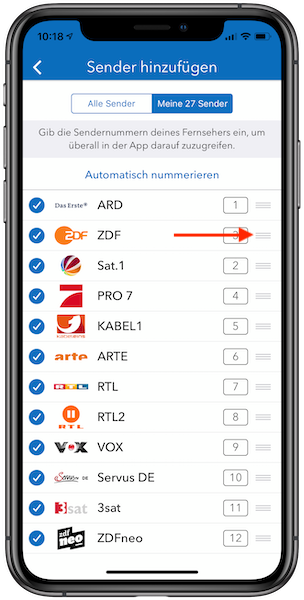
  • Select TV Pro > Settings > Add channels > My channels
  • Tap the handle on the right and drag the channel to the desired position
  • The “Automatic numbering” function can be used to assign numbers to the channels. Alternatively, you can manually assign a number to each channel by clicking on the number field next to the channel.
FAQ Image - S_1100.png
If numbers have already been assigned in the past, these can be corrected under Settings - Add channels - My channels. Then, as usual, tap on the number fields on the right and enter a different number. Tip: It is easiest to first sort the channels there in the order of your television and then tap on “Automatic numbering” at the top. If you add channels later, they will not automatically be assigned a number. Move the channel back to the desired position and tap on “Automatic numbering” again. If the channel order is still incorrect or some channels cannot be changed, it may help to remove all channel numbers at the very bottom of the “My channels” list and start numbering again.
Datenschutz-Einstellungen